


Paying rent is rarely difficult because of the payment itself. The trouble usually comes from remembering the due date, finding the right maintenance contact, checking whether a request was received, and keeping several small resident tasks in one place. I found that RentCafe Resident is most useful when treated as a practical home-management tool rather than as a complete replacement for every conversation with a property office.
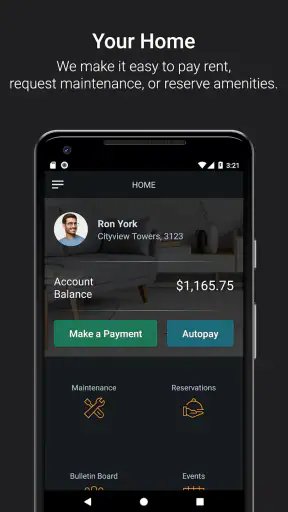
Developed by Yardi Systems, this free Lifestyle app brings common resident actions into one mobile space. Its main purpose is straightforward: I can handle rent payments, send work orders, and manage other apartment-related tasks without searching through old emails or trying to remember which office number to call. That focus makes it appealing for people who want a repeatable routine, especially when their community supports the relevant features.
The app has built a strong audience, with a 4.8 average from around 171 thousand ratings and more than a million installs. It is rated for Everyone, runs on Android 8.0 or later, and the current version is 26.8.0. Those details matter less than the practical question: does it make living in a managed rental easier? In my experience, the answer is yes, provided your property uses RentCafe’s resident services and you are comfortable doing routine account tasks from a phone.
How the everyday RentCafe routine works
Start with one reliable resident workflow
The best way to use the app is to create a simple sequence and repeat it. I would begin by signing in, checking the home screen for anything requiring attention, reviewing the rent area before the payment deadline, and then looking at open maintenance requests. This takes less effort than opening several separate communication channels, and it reduces the chance that a small task will disappear in an inbox.
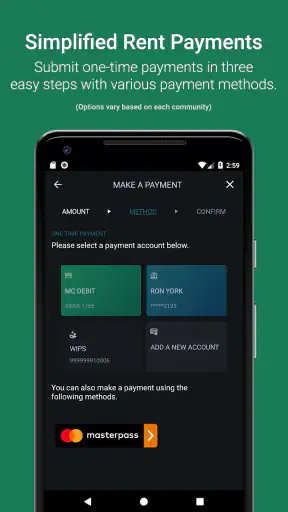
For rent, the important advantage is visibility. Instead of treating payment as a once-a-month emergency, I can open the app during a regular household check-in and confirm what needs to be done. That habit is especially useful for residents who share expenses, have changing monthly obligations, or simply dislike relying on memory. I would still keep the normal confirmation or account record available after completing a payment, because a dedicated record is easier to consult later than a vague recollection that the transaction was submitted.
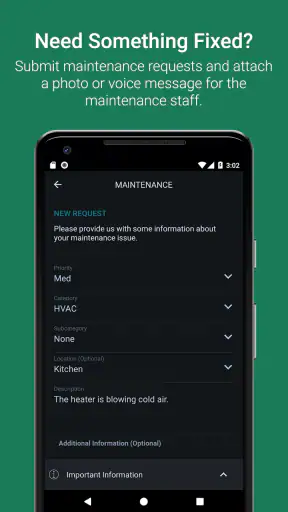
Maintenance is where the app becomes more than a payment shortcut. A work order can be created from the same resident environment, which gives me a clear place to describe a problem. The quality of the request depends heavily on the description, so I would include the room, the affected item, what happens, and whether the issue is intermittent or constant. “The kitchen sink leaks” is less useful than explaining whether the leak occurs under the cabinet, only when the tap runs, or continuously.
A realistic apartment scenario
Imagine noticing a slow bathroom leak before leaving for work. My preferred approach would be to open the app, submit the work order while the details are fresh, and write a short description that helps maintenance understand the situation without a follow-up call. I would mention the exact location, whether water is spreading, and any access information that the property normally expects residents to provide. Then I would save the request details and check its status later rather than sending duplicate messages through multiple channels.
That last point is an underrated benefit. Repeatedly reporting the same issue in the app, by email, and by phone can create confusion instead of urgency. A better habit is to use the resident app as the primary record, then contact the property office directly if the problem is urgent or if the normal process does not fit the situation. The app is convenient for routine requests; it should not be treated as an emergency service.
What the app is really good at
I see three particularly strong use cases. First, it gives renters a consistent place to make rent-related checks. Second, it turns maintenance reporting into a structured task rather than an improvised message. Third, it helps residents who move between work, school, and home keep apartment administration on their phone instead of in scattered notes.
It is also useful for people who dislike phone calls. A written work order lets me think through the problem and describe it accurately. That can be better than explaining a technical issue quickly to someone at the office, especially when the issue is hard to reproduce. The trade-off is that written communication requires care: an incomplete request may lead to delays or clarification messages.
Settings and account details worth checking
Experienced use begins with checking the account and notification behavior rather than assuming the default setup is ideal. I would review whether the correct resident profile and property information appear after signing in, then make sure the contact details associated with the account are current. If a household member normally handles maintenance while another handles rent, deciding who should monitor the account can prevent duplicated work.
I would also pay attention to the app’s notification settings on the phone itself. A resident app can only be helpful if important updates are allowed to reach me, but not everyone wants every alert mixed into their main notification stream. A sensible compromise is to allow useful account or work-order updates while keeping unrelated phone alerts under control. The exact options can depend on the property’s setup and the device, so I would check both the app and the operating system settings.
Another practical check is the payment routine. Before relying on the app for a deadline, I would confirm that the displayed resident account is the one I intend to use and that the payment flow is understandable. This is not a reason to distrust the app; it is simply good financial hygiene. Screenshots of a confirmation can be useful for personal records, but I would avoid storing sensitive information in an unsecured notes app just to keep a copy.
Small habits that make the app faster
The quickest users are not necessarily tapping faster. They are reducing repeated decisions. I would choose one weekly day to open RentCafe Resident, inspect outstanding items, and deal with anything that can be completed immediately. A short routine is easier to maintain than opening the app only when a deadline or repair becomes urgent.
For maintenance, preparing a reusable description pattern saves time without producing lazy reports. I use a mental checklist: location, symptom, timing, severity, and access detail. This is more effective than copying the same vague sentence into every request. Photos may be useful in some property workflows, but I would only rely on options actually shown in the request screen rather than assuming every community supports identical attachments or processes.
For shared homes, a simple division of responsibility can prevent duplicate submissions. One person can monitor rent tasks while another watches maintenance requests, or both can agree that one account is the source of truth. The app does not remove the need for household coordination, but it gives that coordination a clearer place to happen.
I also recommend resisting the temptation to use the app as a general archive for every apartment-related document. Its value is strongest when I use it for the functions it presents: resident account actions, rent tasks, work orders, and related services made available by the property. For leases, legal notices, or important correspondence, I would keep the official documents in a separate, organized location as well.
Where the experience depends on the property
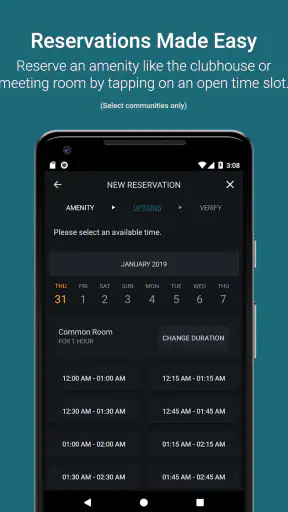
The biggest limitation is not necessarily the app’s interface. It is the relationship between the app and the property’s configuration. RentCafe Resident is a resident portal, so the usefulness of any particular section depends on what the apartment community has enabled and how its office handles requests. Two renters may therefore see different practical value even while using the same application.
That matters when deciding whether it can replace every usual alternative. For a property that actively uses the platform, the app may be more convenient than paper notices, separate payment pages, and phone calls. For a property office that still handles certain matters only by telephone or email, I would continue using those channels when instructed. The app is best viewed as the organized front door to supported resident services, not as a guarantee that every property process has moved online.
There is also a human limitation to digital reporting. A written request records what I entered, but it does not automatically communicate urgency as clearly as a direct conversation. If a leak is spreading, a lockout is happening, or a situation could cause immediate damage or danger, I would follow the property’s urgent-contact instructions instead of waiting for a normal in-app workflow.
Comparison with ordinary rental alternatives
Compared with paying through a browser, the mobile app feels more natural for quick checks because it keeps the resident experience close at hand. A browser may still be preferable when I am reviewing a long document, working from a desktop, or managing several browser tabs at once. For a simple recurring task, though, the app reduces the friction of finding the right portal.
Compared with email, a work-order form is usually more structured. Email encourages long explanations, missing locations, and unclear subject lines. The app’s resident context can make the request easier to associate with the correct home. Email remains valuable when the office specifically asks for it, when I need to discuss a complicated account matter, or when I want a broader written conversation.
Compared with calling the leasing office, the app is more convenient for non-urgent issues and for residents who need to submit a request outside office hours. A call is still better when the matter is time-sensitive, complicated, or likely to require immediate clarification. I would not choose one channel blindly; I would match the channel to the urgency and the kind of response needed.
Who should use it, and who may want something else?
I would recommend RentCafe Resident to renters whose property already relies on it and to anyone who wants a repeatable way to handle rent and maintenance tasks. It is particularly suitable for busy residents, people who prefer written requests, and households that want fewer scattered reminders. Since the app is free, the main question is convenience rather than an extra purchase.
I would be more cautious if your property rarely updates the portal, directs residents to a different payment method, or expects all urgent issues to go through a phone line. In that situation, installing the app may still be worthwhile for whatever functions are available, but it should not become the only channel you monitor. Residents who prefer managing everything from a full desktop browser may also find the phone-first format less comfortable for detailed account work.
Privacy and device habits deserve ordinary attention as well. I would protect the phone with a screen lock, avoid leaving the account open on a shared device, and sign out when using a public or borrowed phone. These are not special complications of this app; they are sensible precautions whenever a mobile tool handles housing and payment-related information.
My final view after building a repeatable routine
RentCafe Resident succeeds because it addresses the unglamorous tasks that make renting feel disorganized. It puts rent actions and work orders close together, gives maintenance requests a clearer structure, and supports a routine that is easier to remember than a collection of separate contacts. The experience is strongest when I use it deliberately: check the account, submit precise requests, monitor the resulting task, and keep alternative contact methods for situations that need a person immediately.
I would not describe it as a universal solution for every property or every rental problem. Its usefulness follows the services enabled by the community, and digital convenience does not remove the need to read instructions or report emergencies through the proper route. Still, for supported residents, the combination of a free app, broad adoption, and a 4.8 average makes it an easy tool to try.
My recommendation is simple: install it if your property uses RentCafe, then spend a few minutes making the account and notification setup fit your household. After that, use a weekly check-in and a precise maintenance-writing habit. The real advantage is not merely paying rent from a phone; it is turning scattered resident chores into a dependable routine.


